
Fast
A production-scale group model runs in about 15 minutes on a laptop, and under 3 on a tuned server. The 200-class demo runs in under 30 seconds.
Underwriting, catastrophe, reserve and asset risk, with reinsurance, in one model that runs in minutes. Ask what is driving a result or request a change in plain language, and approve each step before it runs.
What you can ask Aktua
“Which sources contribute most to our 1-in-100 net loss?”
“Copy the base scenario and set the Property XOL retention to $5 million.”
For project changes, Aktua shows the proposed steps and values for your approval. You supply any missing business assumptions.
A production-scale group model runs in about 15 minutes on a laptop, and under 3 on a tuned server. The 200-class demo runs in under 30 seconds.
Underwriting, catastrophe, reserve and asset risk in one model, with multiple correlation options.
Quota share through aggregate cat XOL, with reinstatements and inuring order. If your structure isn't covered, we build it.
Describe a change, review the proposed steps and approve them. The engine does every calculation.
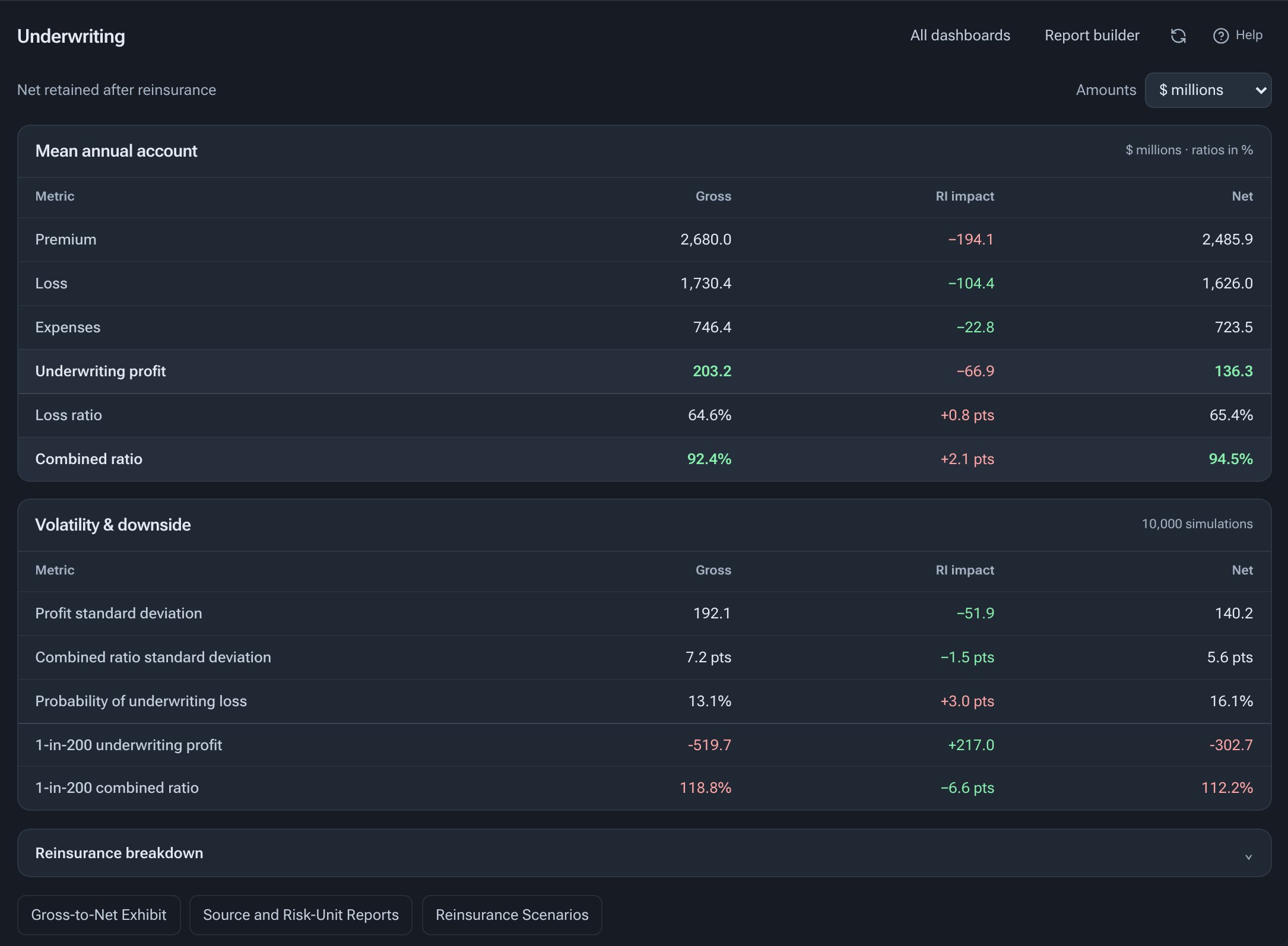
Premium, losses, expenses and profit before and after reinsurance, with volatility and 1-in-200 outcomes side by side.
Attach and exhaust probabilities, the recovery curve by return period, terms and utilization, and which risk units drive the recoveries.
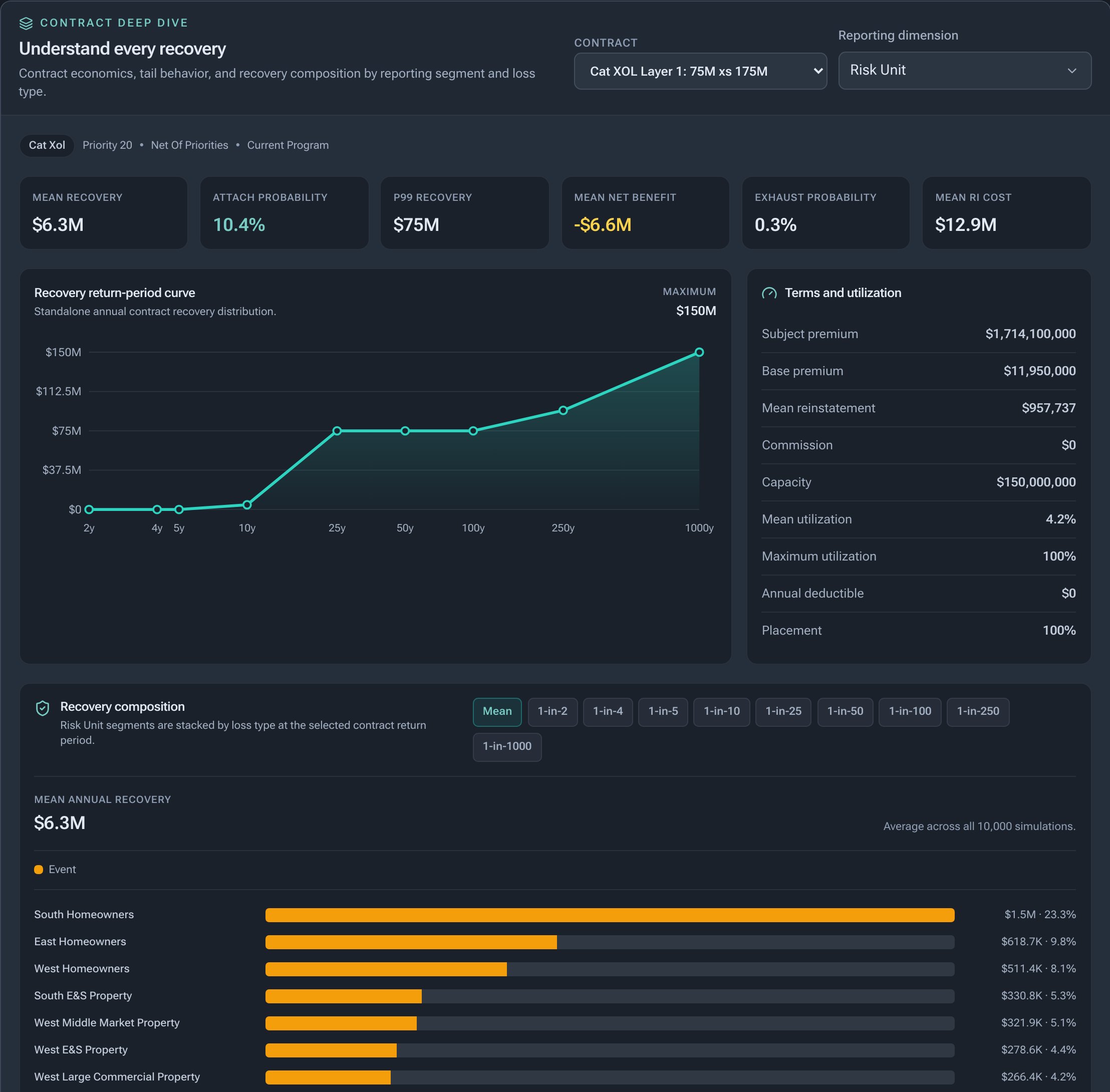
Screenshots from the demo model: a fictional carrier with 200 classes in three legal entities, run with 10,000 simulations.
Each simulated year carries a full economic scenario: yield curves, inflation, credit spreads and equity returns. Claims inflation, discounting, assets and insurance results read the same path, so the capital tail shows the economy behind it.
Two-factor yield curves for USD, GBP, EUR and CAD, projected annually for 50 years. The one-year view discounts on the simulated curves.
Consumer prices by currency, plus US medical and wage indices. Each line's claims inflation is its own mix of price, wage and medical.
US credit spreads by rating and an equity total return, for asset risk and the credit cycle.
Insurance results load on named drivers such as rate moves, inflation surprises and the credit cycle, by entity, line or class. See how much capital comes through the economy, driver by driver.
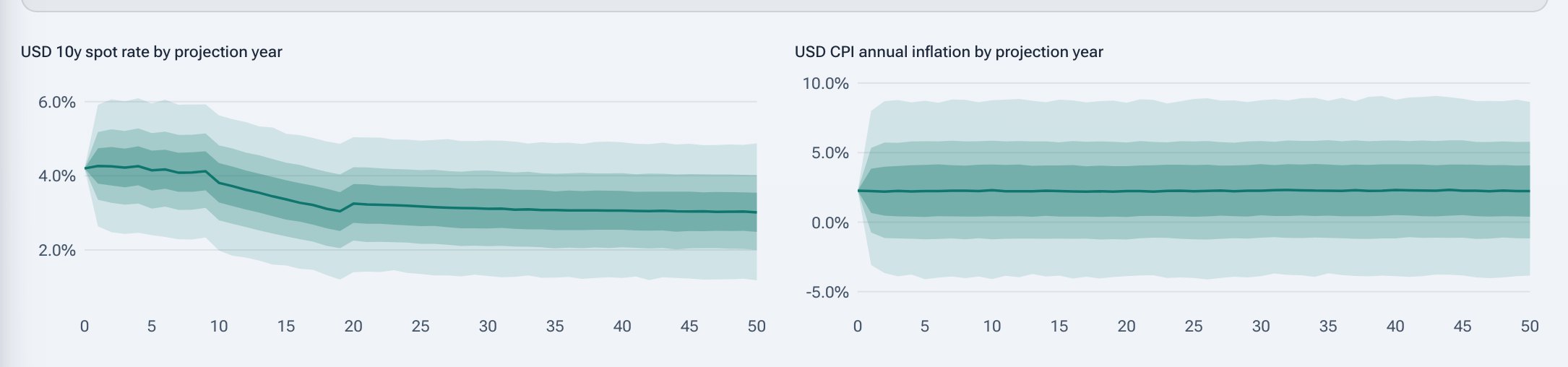
Calibrated to public data from the Federal Reserve, BLS, OECD and Shiller, with every source, retrieval date and file hash recorded.
It can read the current model context, query calculated results, prepare a report, and propose supported changes to scenarios, reinsurance contracts, and simulation settings.
Ask for a metric, a breakdown, or a comparison. The answer draws on the project's calculated results, which you can inspect in the usual analysis screens.
Describe what you want to change. The assistant lays out the exact steps and inputs, saves a snapshot, and waits for your approval before running the plan.
The assistant currently covers selected analysis and project actions in the private alpha. Your team still sets assumptions and makes the final judgment.
See six real answers, replayedMove from observed experience to selected assumptions, then compare the consequences.
Review claims and policy inputs, prepare earned premium, and reconcile the experience you will use.
Compare thresholds, experience periods, and candidate distributions. Save the fit and your selection notes.
Apply selected assumptions, dependence, and reinsurance in a Monte Carlo model.
Compare gross, ceded, and net results. Report in Excel, revise a scenario, and run it again.
For P&C teams that need to connect detailed experience work with portfolio outcomes.
Bring data preparation, calibration, and capital analysis together for a client engagement, with reports that fit the way your team works.
Test attachments, limits, and program alternatives. Show clients how each choice changes recoveries and retained risk.
Investigate assumptions and portfolio scenarios. Evaluate a focused use case alongside your existing modeling process.
Build programs from proportional, per-risk, catastrophe, and aggregate protection. Change attachments, limits, placement, reinstatements, scope, or contract priority—then rerun and compare the retained economics.
Compare gross and net losses, ceded premium, recoveries, and tail metrics to assess the trade-off between protection and retained risk.
Test a reinsurance workflowBring completed simulation results into linked Excel templates. Review scenarios, summarize portfolio risk, and prepare exhibits in a familiar reporting environment.
Excel integration is evolving during private alpha. The walkthrough covers the supported setup for your workflow.
Work locally, retain selected assumptions, and keep completed runs for comparison.
Core model data and simulation run on the user’s machine by default.
Experience data (Aktua Data), calibration studies (Kalibra) and the capital model share one project folder.
Saved settings, seeds, and completed runs support repeatable analysis and comparison.
Save a calibration result, review it, and explicitly apply the selected parameters to the simulation model.
We are inviting actuarial consultancies, reinsurance brokers, and insurer teams to evaluate Aktua through a supported pilot. We can agree on a portfolio and the question you want to answer.
Discuss a supported pilot Founder-led walkthrough and a pilot scoped to your team.